
MOTIONLLM ASSISTANT / 11
Settings reference
Defaults, ranges and scope for execution, generation, constraints, retargeting and generated assets.
Understand which settings apply#
Project Settings → Motion LLM Assistant stores shared project defaults. The standalone MotionLLMAssistant panel stores local overrides. A Prompt track can then override the generation and asset settings it exposes.
The defaults below are the bundled defaults, before project, local or track overrides. Changing a default for new tracks does not update existing track settings.
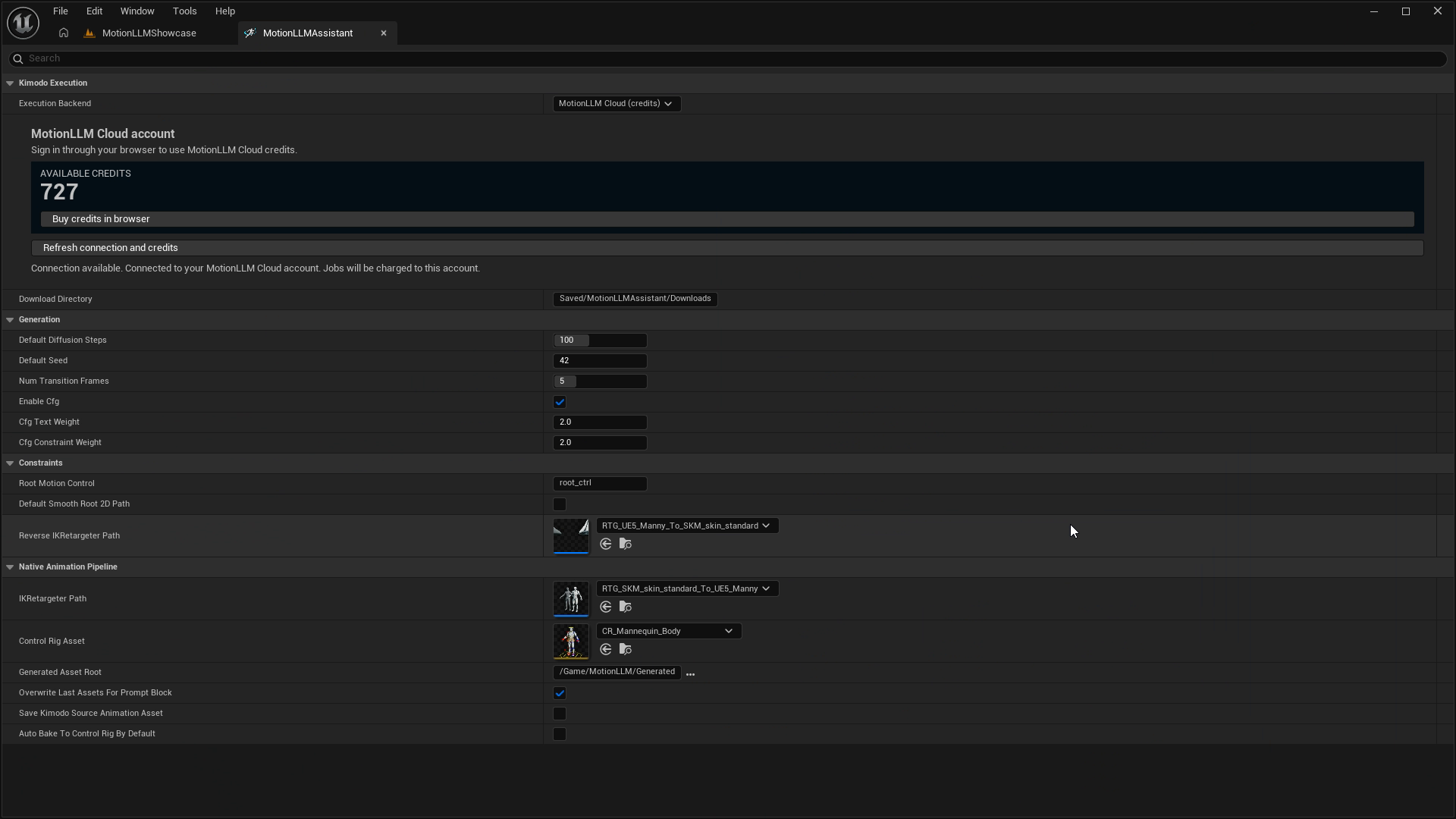
Execution and connection#
| Setting | Default | Purpose |
|---|---|---|
| Execution Backend | MotionLLM Cloud (credits) | Selects the generation provider. Docker and Runtime service API are marked Coming soon. |
| Download Directory | Saved/MotionLLMAssistant/Downloads | Local folder for generated artifacts. Keep this location writable. |
| Kimodo Project Folder | Empty | Docker development configuration; an empty field uses KIMODO_ROOT. Not needed for cloud. |
| MotionLLM Runtime Service URL | http://127.0.0.1:9551 | Runtime service development configuration. Not needed for cloud. |
Generation controls#
| Setting | Default / range | Use |
|---|---|---|
| Default Diffusion Steps | 100 / 1–250 | Number of diffusion steps. More steps may increase processing time; they do not guarantee a better result. |
| Default Seed / track Seed | 42 / cloud: 0–2,147,483,647 | Controls the generation seed. Change it to explore variations. The same seed is not a cross-device guarantee of identical output. |
| Num Transition Frames | 5 / 1–16 | Transition setting for multi-prompt generation, measured in model frames. |
| Enable Cfg | Enabled | Enables classifier-free guidance controls. |
| Cfg Text Weight | 2.0 / cloud: 0–20 | Text guidance weight when CFG is enabled. The editor permits nonnegative values; the cloud API additionally caps them at 20. |
| Cfg Constraint Weight | 2.0 / cloud: 0–20 | Constraint guidance weight when CFG is enabled. The cloud upper bound also applies here. |
Enable Override Generate Settings on a Prompt track for track-specific diffusion steps, transition frames, CFG enablement and weights. These are independent override fields: inspect their displayed values when enabling them. Seed already belongs to the track. Request limits still apply; see Timing and request limits.
Constraint authoring#
| Setting | Default | Use |
|---|---|---|
| Root Motion Control | root_ctrl | Exact Control Rig control name used for Full Body horizontal root motion capture. |
| Default Smooth Root 2D Path | Disabled | Initial Smooth Path value for newly created Root 2D tracks. |
| Reverse IK Retargeter Path | RTG_UE5_Manny_To_SKM_skin_standard | Converts the target pose back into the Kimodo source pair for Full Body capture. |
Animation and output settings#
| Setting | Default | Use |
|---|---|---|
| IK Retargeter Path | RTG_SKM_skin_standard_To_UE5_Manny | Forward source-to-target retargeter; defines the effective mesh and Skeleton pair. |
| Control Rig Asset | CR_Mannequin_Body | Rig used for inverse bake. Must be compatible with the target and support Backwards Solve. |
| Generated Asset Root | /Game/MotionLLM/Generated | Content Browser folder for generated animation assets. |
| Overwrite Last Assets For Prompt Block | Enabled | Reuses the block’s stable output identity to replace its generated animation assets on subsequent generations. |
| Save Kimodo Source Animation Asset | Disabled | Persists the intermediate source AnimSequence. Retargeting still uses an in-memory source when disabled. |
| Auto Bake To Control Rig By Default | Enabled | Initial Auto Bake value for new Prompt tracks. Existing tracks retain their own value. |
Read generation diagnostics#
The Prompt track exposes the latest Job ID, active job, ordered Generated Job IDs, provider, status, pipeline stage, progress message, elapsed time, artifact location, source/target animation paths and generated section identity. Measured diffusion progress is shown only when available.
These fields help locate a failure and identify outputs. They are not substitutes for the authoring controls. When reporting a problem, include the job ID, failed stage and relevant Output Log message, without authentication tokens.